
Dashboard — Compliance & Governance
Ensure your Microsoft 365 environment remains policy-compliant, secure, and audit-ready by tracking active governance policies and what requires attention.
The Compliance & Governance screen helps you ensure that your Microsoft 365 environment remains policy-compliant, secure, and audit-ready. It provides visibility into active governance policies, how much content they affect, and what actions require attention.
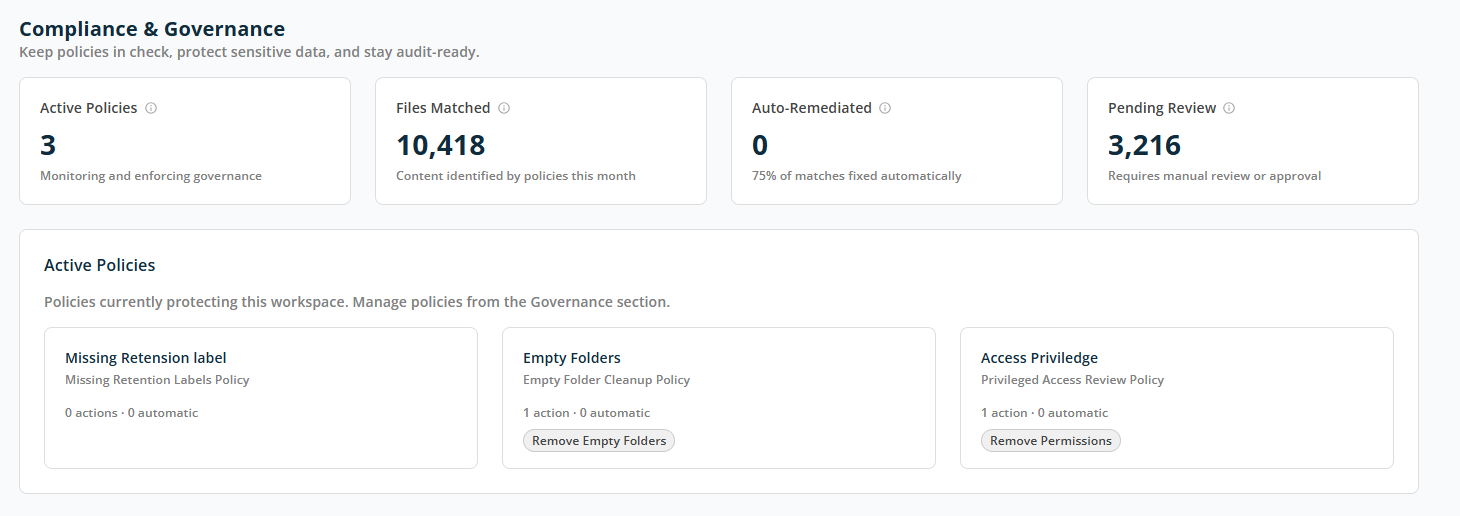
Compliance Summary
The summary cards at the top provide a quick snapshot of compliance activity in the workspace:
- Active Policies — The number of governance policies currently monitoring or enforcing rules in this workspace.
- Files Matched — Number of files identified by governance policies during the current period.
- Auto-Remediated — The number of issues resolved automatically without manual intervention.
- Pending Review — The number of items that require manual review or approval before action can be taken.
Active Policies
This section lists the governance policies currently set up in the workspace. Each policy card shows its Name, Policy rule name, and current activity status. Each policy card is interactive — click on it to open the report screen for the selected policy.